

Listing it! - Checklist
takes all your checklists to a whole new level.
Or several actually.
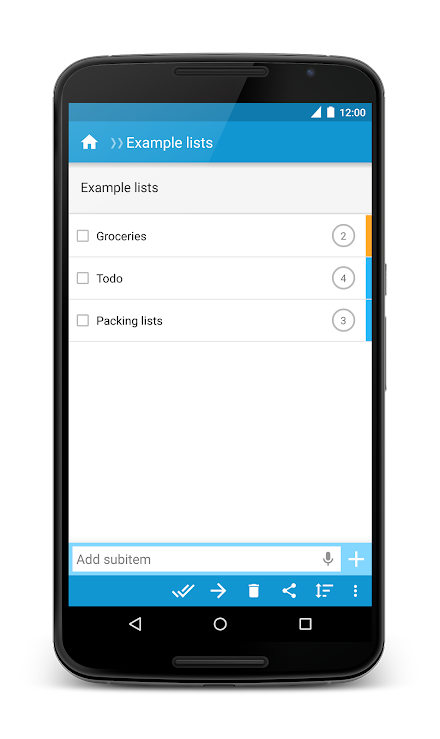
It allows each item in a checklist to become a checklist of its own, allowing you to nest them and put them all in one easy-to-navigate hierarchy.
It comes with a powerful options to import, export and share your checklists.
Once you start using it, you may just find it’s what you’ve been missing to get organized.Making checklists within checklists is a natural thing to do.
Now, with Listing it!, you can do it naturally.Whether youre making a to do list, a grocery list, a project task list, or a packing checklist, or any other sort of checklist, youll love the hierarchical possibilities that listing it provides and the ease with which you can make your tree lists.
You can nest checklists into as many levels as you wish.Features:- Easy sublisting- Marking items as done- Priorities- Manual sorting- Import from pasted text (including sublists)- Import from text file (just open the file from your file browser app and chose Listing it!)- Export to text file (sub lists are properly spaced)- Share a list item or an entire checklist (via email, social media, etc.)- Check and uncheck all items (including or excluding subitems)- Delete checked items- Move items and checklists to other items and checklists- Move all checked items- Shake device to reorder checklist (after changing priority or marking an item as done)*** Permissions ***- Internet: only used to send anonymous information about any crashes if any occur, and to collect anonymous usage statistics so I can figure out what parts of the app I should improve.- SD-card: used to be able to export your lists to a text file, if you wish.
About Listing it! - Checklist
- Package name (App ID)
- com.listing_it
- Available on
- Google Play
- Price
- Free
- Developer
- Ciske Boekelo
Looking for the Listing it! - Checklist APK?
The safest way to get Listing it! - Checklist (com.listing_it) on your Android device is to install it directly from Google Play — you'll always get the latest official version, automatic updates, and no risk of modified or infected APK files from third-party sites.

Social Features
Connect and share with friends and the community.
Productivity Tools
Boost your productivity with powerful tools and features.
Food & Dining
Discover recipes and order food from your favorite restaurants.
See Listing it! - Checklist in Action


Frequently Asked Questions
Is Listing it! - Checklist free?
Yes, Listing it! - Checklist is free to download and install on Android through Google Play.
How do I install Listing it! - Checklist on Android?
Open Google Play on your Android phone or tablet, search for Listing it! - Checklist by Ciske Boekelo or tap the Google Play button on this page, then tap Install. The app downloads and installs automatically.
What is com.listing_it?
com.listing_it is the App ID (package name) of Listing it! - Checklist on Google Play. Every Android app has a unique package name, and it is the safest way to verify you are installing the official app.
Is Listing it! - Checklist safe to download?
Installing Listing it! - Checklist from Google Play is the safest option: you get the official version published by Ciske Boekelo, verified by Google Play Protect, with automatic updates. Avoid APK files from unofficial third-party sites.

Get Listing it! - Checklist Today
Listing it! - Checklist for Android — free download on Google Play.
Compatible with Android phones and tablets — available on Google Play.
Ask AI about this app
Get instant answers about features, tips and more from popular AI assistants.